 MailPro+
Email Forensics Software
for Detailed Email Evidence Analysis
MailPro+ is a Email Forensics Software to examining email files, headers, metadata and attachments. This Email Investigation Tool supports 25+ formats from more than 80 email applications through multiple preview modes.
Scanned with VirusTotal: Clean | Search, Filter & Export Email Evidence
- Analyze Email Files With Attachments Across 25+ Supported Formats.
- Investigate Email Evidence from Microsoft Outlook PST Files.
- Software to Examine Forensic Artifacts From Thunderbird MBOX Files.
- Email Forensics Tools to Inspect Exchange EDB Files Using 8+ Preview Modes.
- Examine Outlook for Mac OLM Files and Attachments.
- Investigate Email Evidence From NSF Files Without Installing Lotus Notes.
- Email Analysis Software to Review Email Data From IncrediMail IMM Files.
- Supports Latest Windows 11, 10 and All Earlier Versions of Windows.
Proud to Work with
Our Prestigious Clients
Trusted Email Forensics Software recognized by prestigious government agencies and fully designed to support accurate investigations.










Email Evidence Analysis
Email Forensics Tools to Analyze Email Evidence
Explore email evidence with MailPro+ Email Analysis Software. It is designed to examine messages, headers, metadata, attachments and other available details with the Advanced search option.

Create a Case and Add Evidence
Organize the analysis by creating a case and adding the supported email evidence files.

Inspect Email Headers & Metadata
Use Email Forensics Software to inspect email headers, metadata, sender, recipient, subject, date, message size, properties and MD5-related information.

Examine Emails in Multiple Views
Review message content, attachments, properties, headers and other available information too through eight preview modes.

Examine Email Attachments
Email forensic tools help to inspect email attachments including documents, images and other files along with related messages.

Narrow Results with Search and Filters
Apply supported search options with advanced filter mode AND, OR, NOT, search by keywords and filter conditions to locate relevant emails in the loaded evidence using Email Forensics Software.

Export Selected Results
Choose relevant items or folders and then configure supported export options including PDF settings and Bates numbering.

Email Header Examination
Header information should be treated as supporting evidence only than standalone proof. MailPro+ Email Forensics Software makes these details completely accessible through its Message Header view which helps investigators to examine email records more closely.
Inspect Message Details
Analyze Email Headers to Examine Sender and Message Details
Investigate Suspicious Messages with Email Forensics Software
Received
Review servers and timestamps recorded as the email moves through the mail system.
Return-Path & From
Compare these fields to identify differences that may need further investigation.
Message-ID
Examine the unique identifier that are associated with the email message.
Date & Time
Check the recorded date, time and also time-zone information for inconsistencies.
Authentication Results
Review available SPF, DKIM and DMARC results to understand email authentication information.
X-Headers
Examine available custom header fields that may contain additional technical information.
 Core Solutions
Supported File Formats
Email Forensics Software Supports 25+ File Format To Analyze Email Data

PST
OST
MBOX
NSF
EDB

OLM
DBX
TBB
IMM

MSG
MBX


Software Capabilities
Advanced Email Forensics Tool Features for Detailed Investigation
Take Investigations Further with Advanced with Email Forensics Software Advanced Features

Analyze 25+ Email File Formats
Email Forensics Tool is the solution trusted by investigators around the world for complex forensic analysis on large volumes of email formats. A compact analysis of a large number of emails belonging to different platforms at once simplifies the inspection to a higher level. The software program supports more than 25 email file formats from more than 80 email clients.
Build Precise Queries with the Advanced Filter
Combine conditions with AND/OR/NOT, group them and then apply negation to a group to exclude noise. Filter by custodian and keyword, preview results on a chart and then open the matching emails. Email Forensics Software has General Search and Wildcard Search search features which is very useful when investigators must narrow thousands of messages to the few that matter.
Track Case Keywords
Investigators can add keywords to a case manually or they can simply import them from a CSV file so the whole team searches against the same list.
Get Case Insights on the Dashboard
Add widgets for total emails, total size, read/unread, deleted mails, mails with attachments and also file types to easily see the shape of the evidence at a glance.
Handle Encrypted and Signed Email
During evidence setup MailPro+ Email Forensics Software can easily detect digital signatures and encryption which allow to add decryption keys (OpenPGP) by key file and password or in bulk from a CSV.
Analyze Email and Calendar Items Together
Switch between Email and Calendar tabs to review messages and calendar entries with sender, sent/received times, location, start/end and attachment markers. Attachments and calendars can be indexed while scanning and the index language can be set.
Export With Naming Control
Export selected items to PDF and set naming conventions (for example Subject + Received Date Time, with delimiter, prefix and suffix) so that the exported evidence is easy to organize and cite.
Investigate Deleted & Corrupted Email Data
MailPro+ Email Forensics Software helps investigators to examine available email data even when files contain deleted or corrupted items. During analysis software will highlight deleted emails and items in red which is easier to identify and review as potential evidence.
Software Guide
How to View Email Files Using MailPro+
Advanced Email Forensics Tool for Detailed Email Analysis
Step 1: Create a New Collection

Users need to launch MailPro+ Email Forensics Software and create a new collection to organize their email evidence for analysis.
Step 2: Add Email Files for Analysis
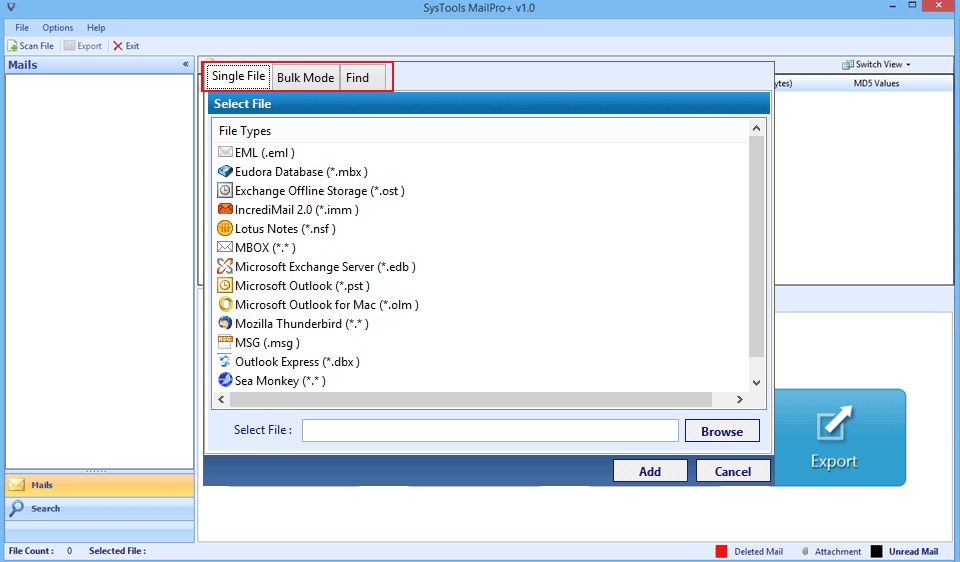
Nest is to select the supported email files you want to examine such as PST, MBOX or NSF based on your investigation needs.
Step 3: Examine Email Data in Multiple Views

Investigators can quickly review complete available email content, headers, MIME details, attachments, and other information using the relevant preview modes.
Step 4: Export Email Evidence

Users can export their selected emails or entire folders in formats like PDF, MSG, PST, CSV and more using multiple export options.
Specifications
Email Forensics Tool Specifications
Free Download Email Forensics Software to Analyze Email Files With Attachments
Score result: Clean
Scanned with VirusTotal which help you ensure a safe and secure download.
- Virus free
- Spyware free
Safe Download Commitment
MailPro+ is verified using proven security processes which completely ensure a safe and reliable experience when using the software.
| Name: | MailPro+ Email Forensics Software |
| Version: | 5.1.1 |
| Size: | 791 MB |
| MD5: | 51491b26140d3fa97d93ad22ea6b0a2a |
| Release Date: | August, 2018 |
| Delivery: | The product delivery is automated. You will receive an email with the link to download the product and the activation key within a few minutes after the payment has been confirmed. |
| Demo Version: |
What's New?
v5.1.1 Features
- Detailed Investigation Dashboard
- General & Wildcard Search
- Advanced Media Filters
- Case Keyword Tracking
- Encrypted & Signed Email Analysis
- Deleted & Corrupted Email Detection

|
Trial Limitations: |
Download Email Forensics Software - MailPro+ Email File Analysis Tool Free Version Will Only Examine Email Files. |

| Hard Disk Space: | 100 MB of free hard disk space required |
| RAM: | 2 GB of RAM (2 GB is recommended) |
| Processor: | Intel® Pentium 1 GHz processor (2.4 GHz is recommended) |

|
Platforms: |
|

|
Application Pre-Requisites: |
|

|
Product Guide: |
Software Comparison
Comparison Between Other Tool vs MailPro+
Features of Other Email Forensics Software vs MailPro+
| Features | Other Software | Recommended MailPro+ |
|---|---|---|
|
01
Supports 12+ Email File Types
|
||
|
02
View Emails from 80+ Email Clients
|
||
|
03
Multiple Email Reading Options
|
||
|
04
8 Different Email Preview Modes
|
||
|
05
Collection Creation for Case Management
|
||
|
06
Auto Search Feature for Email Files
|
||
|
07
Recursive Listing of Email Files
|
||
|
08
Advanced Emails Search Option
|
Why Choose Us
Why Choose Mailpro+
Get Email Forensics Software to Decode Complete Email Data
100K+
Happy Clients
25+
File Supported
50K+
Downloads
15 Yrs+
Experience
100+
Countries
Customer Reviews
What Client Are Saying
Widely Acknowledged for Best Email Forensics Tool



Law Enforcer
Monique Swanson, USA
We handle a variety of email platforms, and with MailPro+ Email Analysis Software, checking each platform is easier and more feasible!

Sr. Investigator
Arthur Christensen, Germany
Before MailPro+ Email Forensics Tool was used to provide an instant service, handling large volumes of emails hiding critical information and connectors was a tedious task.

Computer Forensics Student
Lynette Casey, USA
“The programming of this Forensic Email Analysis Tool is highly commendable, and its processing power is unrestricted.”
Analyze Email Evidence with Advanced Forensics Software
Download Email Forensics Tool to examine email files, attachments, headers and metadata and other evidence.
 Help Desk
Frequently Asked Questions
Common questions about using the MailPro+ Email Forensics Software.
Yes. MailPro+ includes an Attachment view for supported email files which simply allows investigators to examine available attachments along with their related email messages.
Yes, This tool supports email file analysis from 80+ email clients including Lotus Notes, Outlook, Exchange.
Yes, This Email Forensics Software maintains properties and integrity of email files.
Yes. MailPro+ includes an Attachment view for supported email files which simply allows investigators to examine available attachments along with their related email messages.
This Software provides Hex, Message Header, MIME, HTML, RTF, Attachments, Hierarchical, Properties, Normal view modes for Digital Email Forensics purposes.
Yes, This Email File Analysis Software is compatible with Windows OS 11 (64-bit), 10, 8.1, 8, 7 and Windows Server 2025, 2022, 2019, 2016, 2012, 2008.
Still have questions? Contact support or Live Chat