 Free MSG File Viewer Software
Open, Read and Analyze MSG Files Without Outlook
MailPro+ MSG File Viewer Tool lets users open and read MSG files for free, view attachments and email details, search messages and users can analyze MSG data for everyday or forensic use.
*Free to open and view MSG files without Outlook.
- Free MSG Viewer to Open and Read MSG Files Without Outlook.
- Bulk MSG Viewing to Open and Examine Multiple MSG Files Together.
- Large MSG File Support to View and Read Oversized MSG Files Easily.
- Multiple Preview Modes to Examine Messages, Attachments, Headers, Properties & MIME Details.
- Advanced MSG File Viewer Tool to Search Emails Using Keywords, Filters and Conditions.
- Email Investigation Support to Manage Cases, Custodians, Evidence and Search Results.
- Export Options to Save Evidence, Reports, PDFs & Bates Numbered Results.
- MSG File Viewer is Fully Compatible With Windows Versions 11, 10, 8, 7, Etc.
 Preserves All Email Data
Read MSG Files for Free Without Outlook
Go beyond basic viewing use this advanced MSG File Viewer Tool to read MSG files and inspect important email details for a clearer understanding of message context.
Emails

Attachments

Folders

Headers

Date/Time

Metadata
 Core Solutions
Select to Get Multiple Convert Options
Free MSG Reader for Compatible Export To PST, EML, PDF, HTML, CSV and TIFF Formats

PST
OST

MBOX
NSF
EDB

OLM
DBX
TBB
IMM

MSG
MBX


Compatibility
MSG Viewer for Different Email Sources and Use Cases
Open MSG files from Outlook, email backups, shared systems and for legal exports without installing Outlook on your Windows computer.

Outlook Files
Created from Outlook

Shared Messages
Received from others
Archived Emails
Saved from backups

Case Evidence
Used for investigations

Older Outlook
Open files from older versions

Stored Messages
Access archived MSG messages

Corporate Emails
Review saved business emails
Advanced MSG File Reader
Advanced MSG File Viewer Tool for Email Investigation
MailPro+ is more than a basic MSG Viewer Software as it offers case creation, evidence scanning, advanced search, filtering, email investigation, eDiscovery, forensic analysis and export capabilities.

Case Based Email Examination
Users can quickly create a case with a title, description and investigator information before adding email evidence. This keeps all related evidence organized within a dedicated case.
Multiple Evidence Files
Add multiple evidence files using this secure offline MSG File Viewer to one case and simply examine them in one workspace even when they come from different email platforms or custodians.

Custodian Based Analysis
Use a Custodian Panel to examine emails from all added evidence together or focus on specific evidence files individually. This helps users to narrow review to relevant custodians or evidence sources.

Keyword Based Investigation
Users can add investigation specific keywords manually or simply import a list of keywords through a CSV file. MSG File Viewer Tool uses these keywords to identify relevant emails within the collected evidence.

Advanced Search & Filters
Use General Search and Wildcard Search to locate specific information. Also apply AND/OR conditions, custodian filters, keyword filters, groups and additional conditions to narrow down results in large email collections.

Review Deleted Email Items
If deleted items are found within the supported evidence the software can easily recover and display them separately in the email preview. These items appear in red helping to identify them during the examination of the evidence.

 MSG Viewer Software
 With Multiple Email Preview Modes
One of the best advantages of this MSG File Viewer Software is having features like multiple preview modes that not only show visible email messages however users can simply access different parts of the message structure for detailed email examination. Get complete support of nine preview modes.
This makes MSG File Viewer Tool far more useful than just for reading emails. Investigators can examine the various layers of available message data when they need an in depth analysis of the emails.

| Preview Mode | What Can Examine |
|---|---|
| Normal | Standard email content |
| HTML | HTML rendered message content |
| RTF | Rich Text email content |
| MIME | MIME related message information |
| Message Header | Header level email information |
| Properties | Available message properties |
| Attachments | Files attached to the email |
| Hierarchical | Structured email information |
| HEX | Underlying hexadecimal representation |
Software Capabilities
Key Features of MSG Viewer Software
MSG File Viewer to Open, Read, Search and Analyze Large or Corrupted Outlook MSG Files Easily
Open MSG Files Without Outlook
The MSG File Viewer allows users to examine supported MSG messages without relying on Microsoft Outlook. This is very useful when Outlook is not installed or when users simply want an independent way to inspect saved email files.
View MSG Emails With Attachments
It is often necessary to examine emails alongside their attachments. MailPro+ provides the best MSG Viewer tool to view attachment and identify or examine the files that are associated with the selected message.
Examine Email Metadata and Properties
Best for depth analysis of MSG files then simply reading the email content is not enough. Use this advanced software which allows to view message headers, properties, and other important details. This information helps investigators to better understand the email and examine it appropriately.
Search Large Email Collections
When there are dozens, hundreds or more MSG files involved at this stage manually opening every message is not easily possible and need search and filtering features. This will help users to narrow the collection and find only specific details which are needed for investigation.
Recover Deleted Email Items
The advanced feature of MSG File Viewer allows investigators to recover available deleted emails from scanned evidence and display them in red which is simply helping investigators to quickly identify and review deleted messages.
Add Keywords From CSV
With this feature investigators can manually add keywords or import a CSV file containing a list of keywords. This proves useful when a case involves numerous names, terms, project names, or other search criteria.

Apply AND, OR and NOT Conditions
Advanced filtering allows investigators to create more specific search conditions as per need. Results can be narrowed down by combining groups and conditions also unwanted matches can be excluded using negative criteria.
Export Selected Investigation Results
After reviewing the email evidence it is possible to export selected items or entire folders. The export process also offers customization options and supports multiple output formats and advanced export settings including PDF options and reporting features.
Best Tool To
Open and Read MSG Files for Everyday Users
Use This Advanced MSG File Viewer to Open and Read MSG Files Without Microsoft Outlook
No Outlook Needed
Open MSG files without installing Outlook or configuring a separate email account.
Quick Email Preview
Read message content and important email details directly from one easy to use interface.
Easy Attachment Access
View attachments alongside the message without switching between applications or opening Outlook.
Multiple File Support
Open multiple MSG files when need to review emails received from people or sources.

Free MSG Viewing
Quickly preview MSG email content at no cost before deciding whether advanced investigation features are needed or not.

Clear Email Details
Users can check sender, recipient, subject, date, message content and other available email information in one place.
Simple Windows Access
Use MSG Viewer Software on Windows OS to quickly inspect saved email files whenever needed easily.

Multiple File Handling
Examine multiple MSG files when handling emails from various sources or users on a daily basis.
Software Guide
Screenshots and Video
How to Open MSG File Without Outlook
Step 1: Download MSG File Viewer Tool

Download and install the free MSG Viewer Software on Windows computer.
Step 2: Select the Required Format
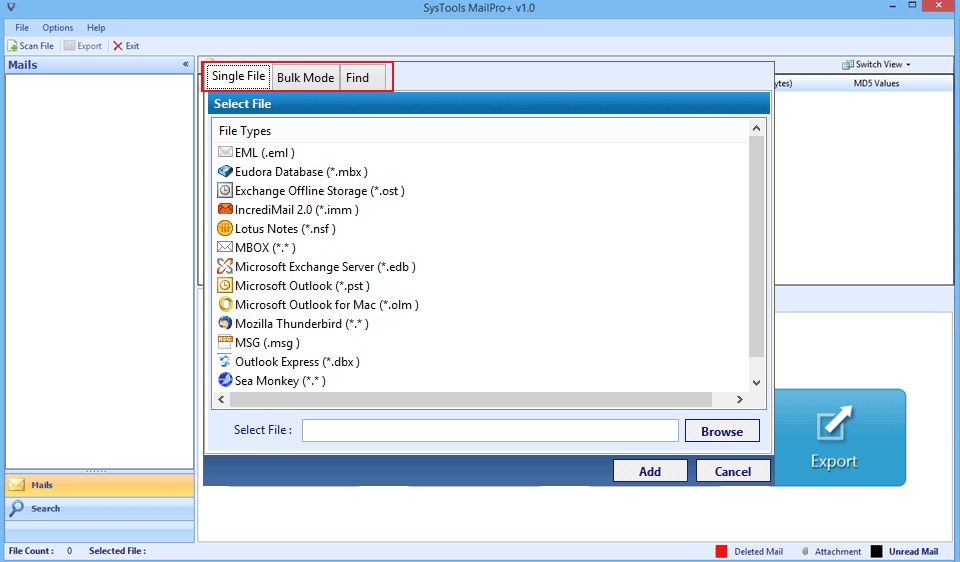
Now only need to select the the required format.
Step 3: Use The Advanced Search
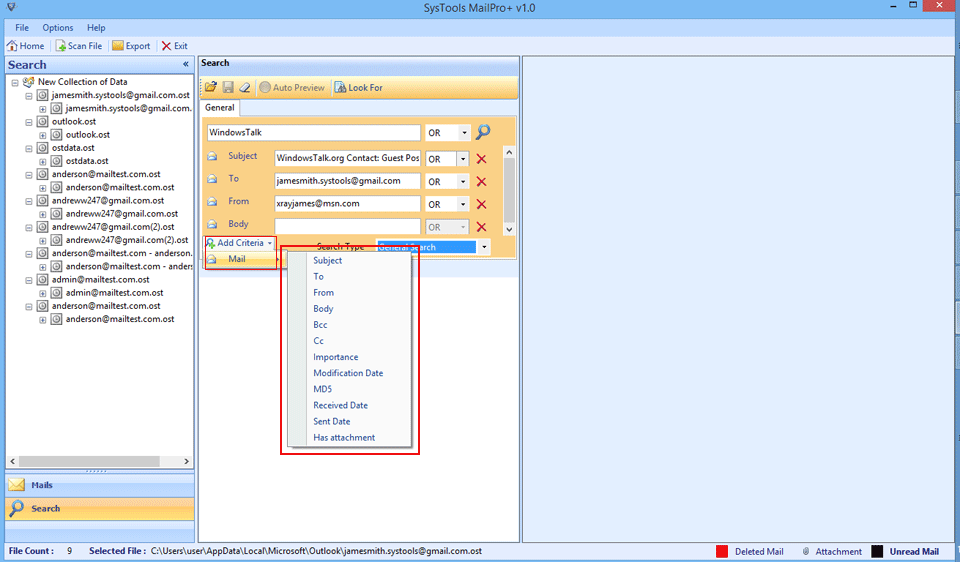
Users can use advance search option to find specific email and information.
Step 4: Deep Scan Process

Software will start deep scan process on the evidence files.
Step 5: Multiple View Modes
Software lets users preview emails and calendars and users can also use multiple view modes.
Step 6: Select Destination
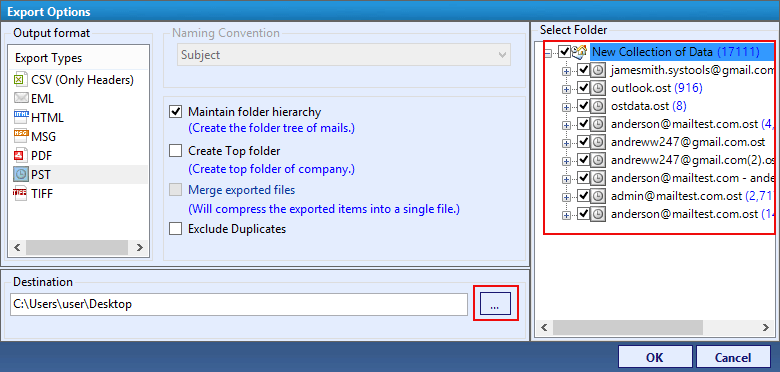
Now Simply Select Destination File Format for Export Process.
 Who Should Use
 This MSG File Viewer?
Useful for anyone who needs to open, read or examine MSG files safely.

For Outlook Users
If users have saved MSG files but they do not want to open Microsoft Outlook just to inspect them then the MSG File Viewer provides a complete independent way to preview the messages.

For IT Administrators
IT teams can use the Outlook MSG File Reader Tool to examine saved messages and they can easily troubleshoot, migrate or manage email data.

For Digital Forensic Investigators
Investigators can go beyond simple viewing by using features for case management, evidence processing, searching, filtering, metadata views and exporting.

For Legal and eDiscovery
When emails are part of a case then Investigators need the ability to search, filter, organize and export relevant messages as it can make the review of large volumes of email simple.
For Business Users
Companies generally store important emails as separate MSG files. A dedicated MSG file viewer software makes it easy to view these files without having to recreate the original Outlook environment.

Cybersecurity Teams
Security teams can use the MSG Viewer Tool to examine email messages, attachments, headers and other available details when investigating any suspicious emails, security incidents or potential email based threats.
MSG File Reader Software
Download MSG Viewer Software
Download MSG File Reader Software to Open and View Large MSG Files
- Open MSG files without Outlook
- Read individual or multiple email messages
- View attachments
- Inspect message details
- Examine different email views
- Search relevant email information
When Investigators requirement becomes more advanced then they can move or upgrade to the pro version for email investigation and eDiscovery needs.

Specifications
MSG File Viewer Tool Specifications
Download Free MSG Viewer software
Score result: Clean
Scanned with VirusTotal which help to ensure a safe and secure download.
- Virus free
- Spyware free
Safe Download Commitment
MailPro+ is verified using proven security processes which completely ensure a safe and reliable experience when using the software.
| Name: | MailPro+ MSG Viewer |
| Version: | 1.0 |
| Size: | 31.9 |
| MD5: | 51491b26140d3fa97d93ad22ea6b0a2a |
| Release Date: | August, 2018 |
| Delivery: | Free via Email |
| Free Version: |
What's New?
v1.0 Features
- Optimized interface interaction.
- Enhanced MSG email preview.

|
Trial Limitations: |
Free MSG Viewer software Demo Version will export 50 items and allow adding 2 files of each type only. Demo version of Software scans the file size up to 2GB and allow adding 10 files in a collection. |

| Hard Disk Space: | 100 MB of free hard disk space required |
| RAM: | 2 GB of RAM (2 GB is recommended) |
| Processor: | Intel® Pentium 1 GHz processor (2.4 GHz is recommended) |

|
Platforms: |
|

|
Application Pre-Requisites: |
|

|
Product Guide: |
Why Mailpro Plus is Global Leader
Why Choose Mailpro Plus
This Free MSG File Viewer delivers a simple and reliable way to open, view and manage Outlook MSG archives.
10K+
Happy Clients
250+
Products
50K+
Downloads
15 Yrs+
Experience
100+
Countries
Globally Certified
What Client Are Saying
Mailpro Plus is widely acknowledged as the No.1 Free MSG Viewer Tool



Email & Data Management Professional
Sharleen Mcduffie, Ireland
“I regularly work with different email file types so having one tool to open, examine and convert them has been really very helpful. The multiple viewing options make it easier for me to check the emails properly. I genuinely want to thanks for such an amazing solution”

IT Professional
Natalie Chopra, USA
“I needed a reliable solution for viewing a large collection of Outlook MSG files. This MSG file viewer software made the process much easier for me and I was able to easily open and read all email data with attachments easily without losing the original information and also search features specially using filters like AND and NOT operators help me a lot to find specific data for my large msg file collection.”

Electronic Data Analysis Professional
Christia Espinoza, Spain
“We needed an MSG email viewer that could handle different formats for our institute. MailPro+ has a friendly and simple interface and our team can use it without much guidance. So big thanks and I must recommend it to others as well.”
Open, View, and Read MSG Files in Bulk for Free
Whether users simply want to read MSG files for free or they need a professional platform for email analysis this software offers both options.
 Frequently Asked Questions
Common questions about using This MSG File Reader Tool.
Yes users can open MSG files without installing Outlook as software allows to open and view supported MSG files without the need of Microsoft Outlook.
Yes. users can use this tool as a free msg file reader software which allows to preview supported email files. If need advanced features such as investigation, filtering, case management and export then users or Investigators need to upgrade for the full version.
Yes. This software is designed to handle email data through a dedicated viewing and investigation environment which makes it much more useful when users need to examine a large collection of MSG files rather than opening each message individually in Outlook.
Yes users can search specific emails, attachments and all other data as per their investigation needs. The MSG File Viewer Tool provides keyword based searching and filtering options. Users can enter keywords manually or import a CSV file containing multiple keywords to which will help them locate relevant emails in an investigation.
Yes. The MSG Viewer Software provides an Attachment view so users can examine their files associated with an email along with the message itself.
Still have questions? Contact support or Live Chat