 Free MBOX File Viewer
Open and Read MBOX Files in Bulk
Free MBOX Viewer is a simple tool to open, view and reads Windows and Mac MBOX files easily. Use MailPro+ MBOX Reader Software fully supports oversized, bulk and corrupted MBOX files from more than 20 email applications including Google Takeout, Thunderbird, Eudora and Apple Mail.
*Free to open and view MBOX files without email client installation.
- Free MBOX Viewer to Open and Read MBOX Files.
- No Thunderbird Required View MBOX Files Without Any Email Client.
- Google Takeout Support to Open Gmail MBOX Backup Files With Ease.
- Bulk MBOX Viewing to Open and View Multiple MBOX Files Together.
- Large MBOX File Support to Easily View Oversized MBOX Archives.
- Easy Interface to View and Read Emails With Attachments.
- Remove Duplicate Items Automatically Using This Free MBOX File Reader.
- Preserve Folder Structure and Keep The Original Mailbox Organization Intact.
- Corrupted MBOX Support to View Damaged or Partially Accessible MBOX Files.
 Preserves All Email Data
Best Free MBOX File Viewer Software
Emails

Attachments

Folders

Headers

Date/Time

Metadata
 Core Solutions
Email Format Converter
Free MBOX Viewer for Compatible Export Formats

PST
OST

MBOX
NSF
EDB

OLM
DBX
TBB
IMM

MSG
MBX

Compatibility
MBOX Viewer for Different Email Archives
MBOX is used by multiple email applications. Means MBOX files come from different sources. Use MailPro+ Free MBOX File Viewer to read MBOX archives created or exported from supported email applications.

Mozilla Thunderbird
Cross platform email client

Apple Mail
macOS and iOS mail client

Gmail Takeout
Google mailbox data export

Postbox
Powerful desktop email client

SeaMonkey
Mozilla internet suite
Evolution
GNOME email and calendar client

Eudora
Classic desktop email client
The Bat!
Windows email application
Claws Mail
Lightweight email client

Opera Mail
Desktop email application
Spicebird
Email and collaboration client
Sylpheed
Simple desktop email client
These are just some popular sources. MailPro+ also supports MBOX files that are created or exported from many other email clients covering 20+ email clients and sources.
Old MBOX archive
Not Sure What's Inside MBOX File?
Before deleting your old MBOX archive you must first open it and check what it contains. A quick review can help you find emails, attachments and information worth keeping.
Check Before Deleting
- Old Emails: Find conversations you may still need.
- Attachments: Check your important files they stored inside emails.
- Business Records: Review older work related communication.
- Personal Messages: See which personal emails remain archived.
- Archive Value: Decide if the MBOX is worth keeping.
Don't Delete Blindly
- Lost Conversations: Important messages may exist only in this archive.
- Missing Attachments: Your old documents may not exist anywhere else.
- Forgotten Records: Archived business emails can contain useful details
- Hidden Information: The filename alone cannot tell you everything.
- Future Need: Email that seems useless today may be needed later.
What Can MailPro+ Do?
Usefulness of Free MBOX Viewer
MBOX files can contain hundreds, thousands or even millions of email messages and Windows does not provide an option to double-click MBOX file and read emails inside it. MailPro+ solves this problem by giving you a dedicated Windows MBOX File Viewer.
Read MBOX Files Without Importing
Open MBOX files directly from your computer and access the email data that is stored inside. No Thunderbird or Apple Mail Needed.

Quick MBOX File Inspection
You can Open email quickly and check its sender, recipient, subject, date and complete message content.

Manage Multiple Evidence Files
You can add multiple MBOX Files or email evidence and manage them from one place. You can also remove any added file.
Multiple View Modes
The MBOX Viewer Software allow you to easily preview your emails and calendars using multiple view modes.

View Google Takeout Emails
You can open MBOX files exported from Gmail through Google Takeout and browse the archived messages.
Preview Calendar Items
You can view calendar data that is stored within supported email archives along with your email content.
Software Capabilities
Get An Insight of MailPro+ Features
Advanced Features of Free MBOX Viewer Tool
View MBOX File Viewer Data
MBOX Viewer software supports viewing MBOX Data file items which provide multiple export options: PST, MSG, EML, PDF, and Print. With the help of MBOX Reader where you can easily view MBOX files along with attachments. Use this .mbox Viewer software to browse & Open MBOX file.
Open & Extract MBOX File
The MBOX file can be a browser tool that allows users to open and extract MBOX files without accessing the MBOX email client. The MBOX Viewer shows the preview of all the data emails along with attachments, such as documents, images. And, also retains MetaData.
View MBOX Emails with Attachments
In addition, the MBOX File Viewer helps a user to view the emails along with attachments. It also maintains Metadata integrity of all the emails. MBOX file reader also allows users to export MBOX files to Outlook PST format.

Keep Same Folder Structure
The MBOX Viewer Software helps users to easily Open & View all the files from the MBOX mailbox file within the same folder structure. The standalone MBOX file reader application can open and extract the MBOX files without any other application.

Load MBOX Files Automatically
However, the MBOX Viewer tool first step is to scan the entire system and show all MBOX database files. This MBOX file opener Tool adds them automatically to save user’s time which making it more reliable and time saving utility.
Inspect Headers & MIME Content
Software allow you to view complete email header details and you can quickly examine MIME structure of MBOX messages. Check important message information and email content when you want to know how exactly email is structured.
Open Corrupted MBOX Files
Working with your corrupted MBOX file. Where other MBOX file reader software makes it difficult to access and read corrupted files but with this software you can easily open and read your corrupted MBOX file.
Automatically Remove Duplicate Emails
MailPro+ MBOX opener automatically identifies and removes all duplicate email items while viewing MBOX files which help you to review clean, organized mailbox data without repeatedly seeing the same messages.
Why Choose
MailPro+ Free MBOX File Viewer?
Rated Best to Securely Open and View MBOX Files.
Best Viewer to Open and Read MBOX Data

Free to Use
Open and read MBOX files without paying for basic viewing functionality.
Thunderbird
Access your MBOX archive without installing Thunderbird.

Bulk MBOX Support
Work with multiple MBOX files instead of opening them one by one.

Universal MBOX Support
Open MBOX files from more than 20 email clients.
View MBOX File With Attachments
Google Takeout Ready
Open MBOX archives exported from Gmail through Google Takeout.
Attachment Viewing
You can read messages and inspect their associated attachments.
Simple Interface
Designed so that even first time users can easily understand the working functionality.

Built for Large Archives
The MBOX Viewer software is designed to make your large MBOX collections easier to inspect.
Advanced MBOX Forensics
Examine MBOX files with advanced search options, evidence filtering, investigation and forensic analysis features.
BEST FOR DATA FORENSICS & DISCOVERY

Manage Investigation Cases
Create a specific case with the investigator's details, a description and the storage location to keep MBOX evidence organized throughout the email investigation process.
Add Evidence Files
You can add one or multiple MBOX evidence files to a case and using this advanced MBOX Viewer simply examine them together or separately without creating a separate case.
Preview Email Evidence
Option to view email messages, attachments, properties, headers, MIME content and RTF and HEX data in order to examine both the visible and technical information of the email.

Search Case Evidence
You can search for evidence in MBOX files using keywords, sender details, message content and any other available criteria to quickly locate emails relevant to your investigation.

Apply Advanced Filters
Use the AND, OR and NOT filters to combine search criteria and narrow down results when examining large volumes of email evidence using this Free MBOX Viewer.

Examine Custodian Data
Use the Custodian Panel to examine selected evidence sources individually or together that help investigators focus on specific users, mailboxes or evidence files.

Find Deleted Items
Identify compatible deleted email items within the evidence and display them separately thereby helping investigators to locate messages that may be relevant to the case.
Filter Media Attachments
Option to filter emails based on media categories and attachments to quickly locate documents, images, reports and other files connected with investigation.

Create Forensic Reports
Generate detailed export reports and customize PDF properties, attachments, naming conventions and Bates numbering to organize investigation results for case documentation.
Software Guide
Screenshots and Video
How to Open an MBOX File with MailPro+
Step 1: Download MBOX Viewer Tool

Download and install the free MailPro+ MBOX Viewer on your Windows computer.
Step 2: Select Your Required Format
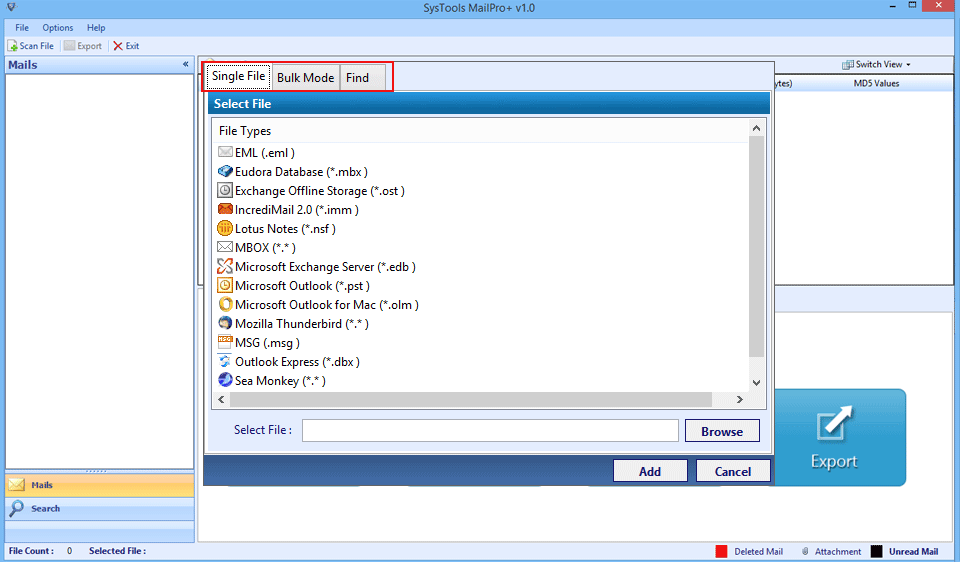
Now you just need to select the the required format.
Step 3: Use The Advanced Search
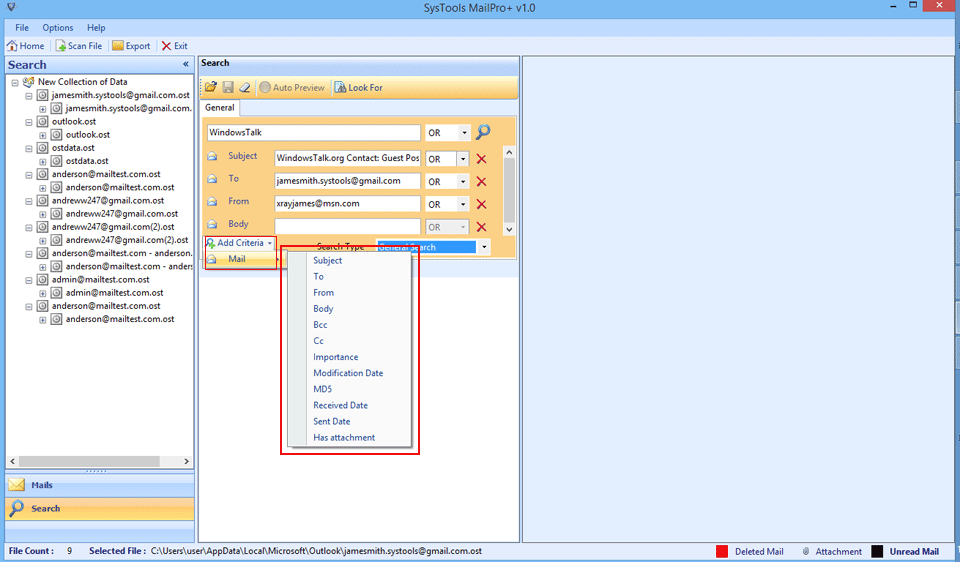
You can use advance search option to find specific email and information.
Step 4: Deep Scan Process

Software will start deep scan process on the evidence files.
Step 5: Multiple View Modes

Software lets you preview emails and calendars and you can use multiple view modes.
Step 6: Select Destination
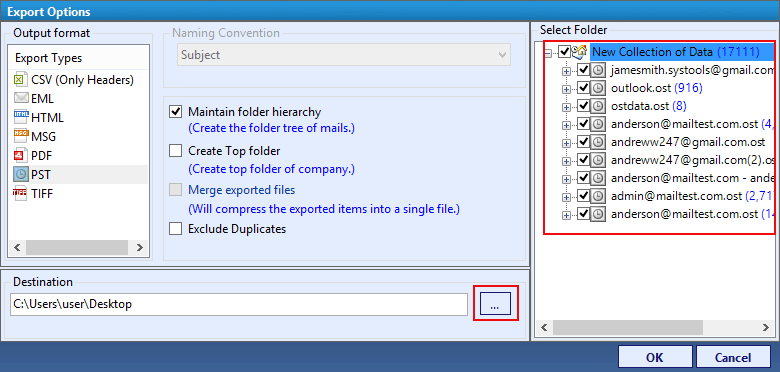
Now Simply Select Destination File Format for Export Process.
 Who Should Use
Who Should Use MailPro Plus
MBOX File Viewer is ideal for users handling MBOX files, archives and email data.

For Individual Users
If you have an old MBOX backup that you simply want to read then Using this free MBOX Viewer Tool you can quickly access all your emails without having to install Thunderbird.
No Thunderbird Needed

For IT Professionals
If you need to inspect multiple mailbox archives then you will love Bulk MBOX viewing features and detailed email inspection that can simply make archive handling easier.
Archive Handling is Easier

For Legal Teams
This is the best rated tool if you need to search and review large volumes of MBOX archived email as the software provides advanced search, filtering, export and analysis capabilities for professional uses.
Review Large MBOX Files

For eDiscovery Professionals
When an email archive is used for an investigation then simply opening a MBOX file is not enough. Here using this advanced MBOX Viewer For eDiscovery will help you quickly search, filter, review and export the emails you need for investigation.
Review Email For Investigation

For Enterprise Users
Businesses may have years of email archives that are stored in different locations and formats. Our software can help teams inspect, search, organize and export all the relevant MBOX data they need.
Search Relevant MBOX Data
For AI Engineers
If you need historical email data for AI or for machine learning workflows then this Pro version will help you with filtering and preparing mailbox information for dataset creation.
Historical Email Data Analysis
MBOX File Locations
Where Are MBOX Files Stored?
MBOX files are stored differently depending on the email client or service and knowing their usual location makes it easier to find, select and open the correct mailbox with MailPro+.
MBOX File
Mozilla Thunderbird
Thunderbird frequently stores MBOX files without a file extension inside its profile folders. On Windows you can check the Mail\Local Folders directory for files such as Inbox, Sent, Drafts and Trash. There subfolders may use .sbd directories.
Apple Mail
Apple Mail stores messages inside .mbox bundle folders on macOS and the mailbox data is typically found under ~/Library/Mail/V[version]/. Exporting a mailbox from Apple Mail creates an .mbox folder containing the actual mbox file.
Gmail/Google Takeout
Google Takeout exports Gmail data as MBOX files inside a downloaded ZIP archive. You can select Mail during the Takeout process, choose MBOX format, download the archive and simply extract it to find files such as All mail Including Spam and Trash.mbox.

 MBOX Forensic Solution
One MBOX Solution for Complete Email Investigation
MailPro+ MBOX Viewer helps to investigators examine MBOX evidence, review email content, analyze attachments, apply advanced searches and organize findings within a structured investigation.
- Evidence Review
- Boolean Search
- Email Analysis
- Multiple Evidence
- Detailed Filters
- Case Management
- Forensic Reporting
- Investigation Ready
We make MBOX handling much easier and faster whether you need to check an old mailbox, review archived emails,or work with multiple email files. It keeps the entire process simple and supports more advanced needs when required.
MBOX Evidence Analysis
Fast MBOX Evidence Review
Open MBOX Evidence for Fast Email Investigation and Forensic Review
- No Email Client Needed: Open MBOX files directly without Thunderbird.
- Bulk MBOX Access: View multiple MBOX files from one interface.
- Google Takeout Ready: Open Gmail MBOX archives without importing.
- Attachment Visibility: Check attachments directly while reviewing messages.
- Folder Browsing: Navigate mailbox folders without losing original structure.
- Buy: Upgrade when need for advance MBOX forensic investigation.
Start with Free MBOX Viewing Today to Open MBOX, Read Emails, View Attachments - No Thunderbird is Required.
Specifications
MBOX File Viewer software Specifications
Download Free MBOX Viewer software
Score result: Clean
Scanned with VirusTotal which help you ensure a safe and secure download.
- Virus free
- Spyware free
Safe Download Commitment
MailPro+ is verified using proven security processes which completely ensure a safe and reliable experience when using the software.
| Name: | MailPro+ MBOX Viewer |
| Version: | 1.0 |
| Size: | 31.9 |
| MD5: | 51491b26140d3fa97d93ad22ea6b0a2a |
| Release Date: | August, 2018 |
| Delivery: | Free via Email |
| Free Version: |
What's New?
v1.0 Features
- Optimized interface interaction.
- Enhanced MBOX email preview.

|
Trial Limitations: |
Free MBOX Viewer software Demo Version will export 50 items and allow adding 2 files of each type only. Demo version of Software scans the file size up to 2GB and allow adding 10 files in a collection. |

| Hard Disk Space: | 100 MB of free hard disk space required |
| RAM: | 2 GB of RAM (2 GB is recommended) |
| Processor: | Intel® Pentium 1 GHz processor (2.4 GHz is recommended) |

|
Platforms: |
|
|
Application Pre-Requisites: |
|

|
Product Guide: |
Why Mailpro Plus is Global Leader
Why Choose Mailpro Plus
MailPro+ Free MBOX Viewer delivers a simple and reliable way to open, view and manage MBOX email archives
10K+
Happy Clients
250+
Products
50K+
Downloads
15 Yrs+
Experience
100+
Countries
Globally Certified
What Client Are Saying
Mailpro Plus is widely acknowledged as the No.1 Free MBOX Viewer Tool



IT Director, TechCorp Inc.
Timothy, London
Earlier I used many free viewers to open Entourage database file but, none of satisfied my needs. But, when I came across this tool it was really surprising for me because the way it works is incredible. The free MBOX email viewer opens and completely expands MBOX messages from processed files. Instead of viewing all emails, it is possible to analyze only wanted emails with this tool. I will title this software as the best MBOX viewer and recommend it to all my friends who are looking for the same.

Digital Forensics Analyst
Samuel, USA
I was in a very big trouble when I was in a need to view Apple Mail created MBOX file on Windows 10. I googled for a solution and then, encountered this tool in first search only. I never imagined that a freeware can work like this! I was able to read MBOX messages with attachments and MD5 values. What makes this product different is that it displays MD5 value of each email that is very much helpful for a forensic investigator like me. Thank you guys for coming up with such an innovative mbox viewer utility!

Records Management Officer
John, Austraia
“I was searching for a very simple way to read my several archived MBOX files and someone suggested to me MailPro+ that worked awesome for this. I liked that I could view emails and attachments directly without setting up an email account. The folder structure was also helpful because it made the old mailbox much easier to navigate. I must recommend this to everyone who want to view MBOX File without installing email client”
Open, View, and Read MBOX Files in Bulk for Free
Have MBOX files from Google Takeout, Thunderbird, Apple Mail or old backups? With MailPro+ MBOX Viewer you can easily open, view and read your multiple MBOX files for free.
Help Desk
Frequently Asked Questions
Common questions about using the MailPro Plus MBOX File Opener.
Yes. The Free MBOX Viewer is designed to allow users to open, read and view MBOX files without paying for any basic viewing functionality.
I want to know if the searching features or parameters provided in this viewer are for free or require cost for this functionality? The searching capability in the MBOX email viewer is available absolutely for free. No additional cost is needed for this feature of the product.
Yes. You can easily open it as the software supports bulk MBOX loading so you can work with multiple MBOX files in the same workflow.
No limit is involved in MBOX Viewer. It is possible to open and view MBOX of unlimited size with this reader.
No, the MBOX freeware is designed for Windows operating system users. It is compatible with all versions of it, including 10.
Still have questions? Contact support or Live Chat